

Revit MCP
★ 2from romanzarkhin
Interact with Autodesk Revit using the MCP protocol. This server provides AI tools and requires the corresponding Revit plugin to function.

revit-mcp
English | 简体中文
Description
revit-mcp allows you to interact with Revit using the MCP protocol through MCP-supported clients (such as Claude, Cline, etc.).
This project is the server side (providing Tools to AI), and you need to use revit-mcp-plugin (driving Revit) in conjunction.
Features
- Allow AI to get data from the Revit project
- Allow AI to drive Revit to create, modify, and delete elements
- Send AI-generated code to Revit to execute (may not be successful, successful rate is higher in some simple scenarios with clear requirements)
Framework
flowchart LR
	CladueDesktop --> revit-mcp --> SocketService--commandName-->CommandlSet--command-->CommandExecute
	CommandManager --> CommandlSet
	CommandExecute --executeResult--> SocketService
	CommandProject1 --> CommandManager
	CommandProject2 --> CommandManager
	CommandProject... --> CommandManager
	subgraph ide1 [MCPClient]
	CladueDesktop
	end
	subgraph ide2 [MCPServer]
	revit-mcp
	end
	subgraph ide3 [Revit]
			subgraph ide3.1 [revit-mcp-plugin]
				SocketService
				CommandlSet
				CommandManager
				CommandExecute
			end
	end
Supported Tools
| Name | Description |
|---|---|
| get_current_view_info | Get current view info |
| get_current_view_elements | Get current view elements |
| get_available_family_types | Get available family types in current project |
| get_selected_elements | Get selected elements |
| create_point_based_element | Create point based element (door, window, furniture) |
| create_line_based_element | Create line based element (wall, beam, pipe) |
| create_surface_based_element | Create surface based element (floor, ceiling) |
| delete_elements | Delete elements |
| reset_model | Reset model (delete process model when executing continuous dialog) |
| modify_element | Modify element's properties (instance parameters) |
| search_modules | Search for available modules |
| use_module | Use module |
| send_code_to_revit | Send code to Revit to execute |
| color_splash | Color elements based on a parameter value |
| tag_walls | Tag all walls in view |
npm installRequirements
- nodejs 18+
Complete installation environment still needs to consider the needs of revit-mcp-plugin, please refer to revit-mcp-plugin
Installation
1. Build local MCP service
Install dependencies
npm installBuild
npm run build2. Client configuration
Claude client
Claude client -> Settings > Developer > Edit Config > claude_desktop_config.json
{
    "mcpServers": {
        "revit-mcp": {
            "command": "node",
            "args": ["<path to the built file>\\build\\index.js"]
        }
    }
}
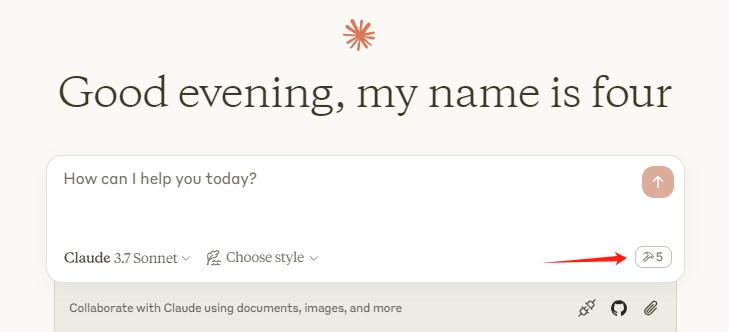
Restart the Claude client. When you see the hammer icon, it means the connection to the MCP service is normal.
No common issues documented yet. If you hit a problem, the repository's GitHub Issues page is the best place to look.
Licensed under MIT— you can use, modify, and redistribute it under that license's terms.
View the full license file on GitHub →