

Flame MCP Server
A Model Context Protocol (MCP) server that provides comprehensive access to Flame game engine documentation for AI assistants like Claude Desktop and Amazon Q Developer.
🎯 What This Does
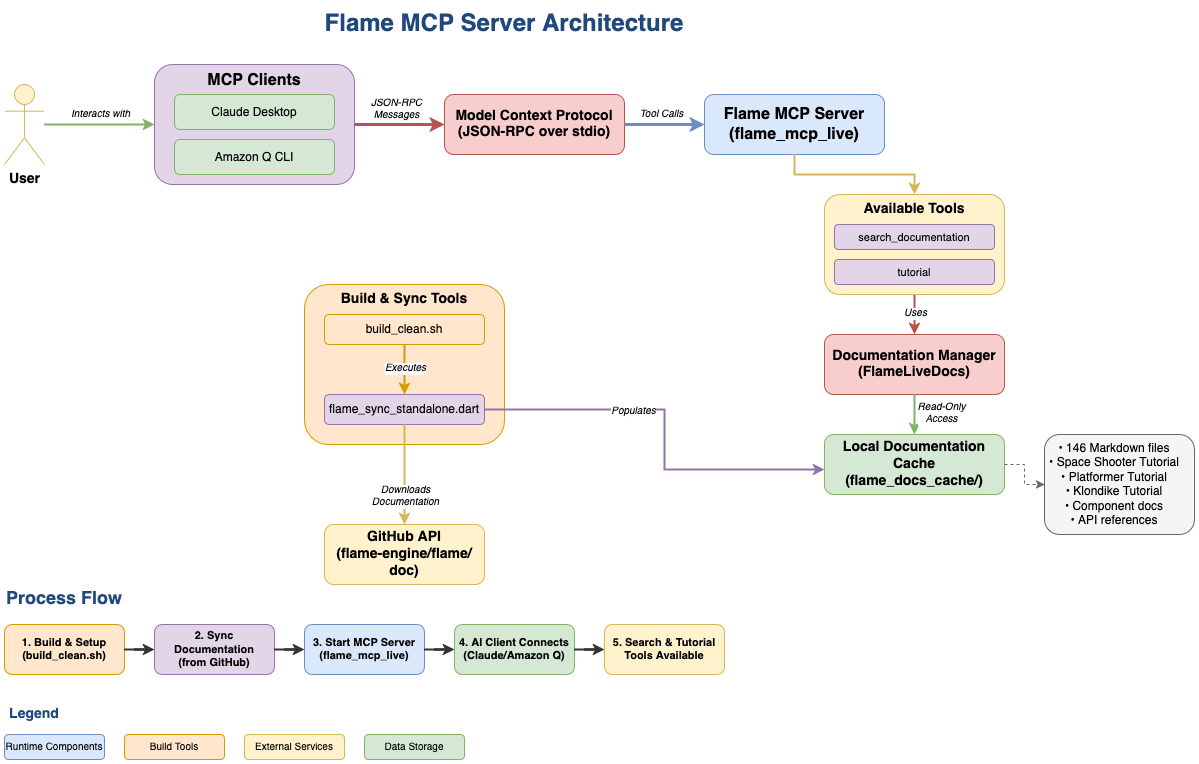
- Documentation Access: Provides searchable access to the complete Flame engine documentation
- Tutorial System: Offers step-by-step game development tutorials (Space Shooter, Platformer, Klondike)
- Local Caching: Stores documentation locally for fast, offline access
- MCP Integration: Works seamlessly with Claude Desktop and Amazon Q CLI
- Search Tools: Intelligent search across all documentation and tutorials
🛠️ Available Tools
search_documentation
Search through all Flame documentation for specific topics.
Example queries:
- "How do I implement collision detection in Flame?"
- "Search for component system examples"
- "Find information about sprite animations"
tutorial
Get complete step-by-step game development tutorials.
Available tutorials:
- Space Shooter: Complete 6-step tutorial for building a classic space shooter
- Platformer: 7-step tutorial for building a side-scrolling platformer (Ember Quest)
- Klondike: 5-step tutorial for building a solitaire card game
Example usage:
- "Show me how to build a space shooter game" → Complete tutorial with all steps
- "I want to create a platformer game" → Full platformer tutorial
- "List all available tutorials" → Overview of all tutorials
📊 Architecture
┌─────────────────┐    ┌──────────────────┐    ┌─────────────────┐
│   MCP Client    │    │  Flame MCP       │    │  Documentation  │
│ (Claude/Amazon Q)│◄──►│     Server       │◄──►│     Cache       │
└─────────────────┘    └──────────────────┘    └─────────────────┘
                              │
                              ▼
                       ┌──────────────────┐
                       │   GitHub API     │
                       │ (flame-engine/   │
                       │    flame/doc)    │
                       └──────────────────┘
📁 Project Structure
flame_mcp_server/
├── bin/
│   ├── flame_mcp_live.dart           # Main MCP server
│   └── flame_sync_standalone.dart    # Documentation sync utility
├── lib/src/
│   ├── flame_live_docs.dart          # Documentation management
│   └── flame_mcp_live.dart           # MCP protocol implementation
├── build/
│   └── flame_mcp_live                # Compiled MCP server
├── flame_docs_cache/                 # Cached documentation (146 files)
├── build_clean.sh                    # Build and setup script
└── README.md                         # This file
🎮 Example Interactions
Building a Space Shooter Game
You: "I want to build a space shooter game in Flame. Show me the complete tutorial."
Response: Complete 6-step tutorial including:
- Project setup and basic game structure
- Player controls and graphics
- Animations and visual effects
- Enemy spawning and movement
- Shooting mechanics
- Collision detection and scoring
Learning About Components
You: "How does the Flame component system work?"
Response: Detailed documentation about:
- Component lifecycle
- Component hierarchy
- Built-in components
- Creating custom components
- Component communication
🔄 Maintenance
Refresh Documentation Cache
# Update to latest Flame documentation
dart run bin/flame_sync_standalone.dart
Rebuild Server
# Clean rebuild with fresh documentation
./build_clean.sh
📈 Performance
- Documentation Files: 146 Markdown files
- Cache Size: ~3 MB
- Sync Time: 30-60 seconds (network dependent)
- Memory Usage: <50 MB when running
- Startup Time: <2 seconds
🤝 Contributing
- Fork the repository
- Create a feature branch
- Make your changes
- Test with
./build_clean.sh - Submit a pull request
📄 License
This project is licensed under the MIT License.
🔗 Related Links
Ready to start building games with Flame? Run ./build_clean.sh and add the server to your MCP client! 🎮
🚀 Quick Start
1. Build and Setup
# Clone and build the server
git clone <repository-url>
cd flame_mcp_server
./build_clean.sh
This will:
- Install Dart dependencies
- Build the MCP server executable
- Download and cache all Flame documentation (~146 files)
2. Configure Your MCP Client
Amazon Q Developer
Add to your MCP configuration:
{
  "mcpServers": {
    "flame-docs": {
      "command": "/absolute/path/to/flame_mcp_server/build/flame_mcp_live"
    }
  }
}
Claude Desktop
Add to claude_desktop_config.json:
{
  "mcpServers": {
    "flame-docs": {
      "command": "/absolute/path/to/flame_mcp_server/build/flame_mcp_live"
    }
  }
}
Config file locations:
- macOS:
~/Library/Application Support/Claude/claude_desktop_config.json - Windows:
%APPDATA%\\Claude\\claude_desktop_config.json - Linux:
~/.config/Claude/claude_desktop_config.json
3. Restart Your MCP Client
Restart Claude Desktop or Amazon Q CLI to load the Flame documentation server.
🔧 Configuration
GitHub Token (Recommended)
For better rate limits (5,000 vs 60 requests/hour):
-
Create a GitHub Personal Access Token:
- Go to GitHub Settings → Developer settings → Personal access tokens
- Generate new token with
public_reposcope
-
Set environment variable:
# macOS/Linux
export GITHUB_TOKEN=your_token_here

# Windows
setx GITHUB_TOKEN "your_token_here"
📋 Prerequisites
- Dart SDK: Version 3.2.0 or higher
- Internet Connection: Required for initial documentation sync
- MCP Client: Claude Desktop, Amazon Q CLI, or compatible client
🐛 Troubleshooting
Server Not Found
- Ensure you're using the absolute path to the executable in your MCP config
- Verify the executable exists:
ls -la build/flame_mcp_live - Check file permissions:
chmod +x build/flame_mcp_live
No Search Results
- Run
./build_clean.shto rebuild cache and server - Check cache exists:
ls flame_docs_cache/ - Verify cache has content:
find flame_docs_cache -name "*.md" | wc -l(should show ~146)
Rate Limit Issues
- Set up a GitHub personal access token (see Configuration section)
- Check rate limit status in sync logs
Licensed under MIT— you can use, modify, and redistribute it under that license's terms.